At my current company, we initially didn't have any visual regression testing in place for our design system. When I introduced Playwright snapshots, we quickly ran into an issue: locally, we were running snapshots on macOS (darwin), but our CI was generating them on Linux. This mismatch meant our snapshots would differ between local development and CI, making it difficult to maintain consistency.
The Problem: Mac vs. Linux Snapshots
As a team, we all develop on macOS machines, so locally, the snapshots were consistently generated for that platform. However, our CI environment was running on Linux, which meant that the snapshots it generated were slightly different. This caused a ton of issues when trying to run visual regression tests - the snapshots simply didn't match.
This issue is described more thoroughly in Tony Ward's "It's Time to Disrupt Visual Regression Testing" article.
We explored two potential solutions:
-
Running Docker locally and in CI: This would ensure both environments use the same base image. However, this wasn't an option for us due to licensing restrictions and the steep learning curve it would introduce for our team.
-
CI as the Source of Truth: We could let CI become the maintainer of our snapshots, where CI would generate and approve the snapshots, ensuring consistency.
Ultimately, we chose the second option. This meant our CI pipeline would handle the generation, review, and approval of snapshots, creating a unified process across our team.
Solution: Let CI Manage Snapshots
To make this happen, I built two GitHub Actions to ensure a seamless workflow for running Playwright tests and updating snapshots. These actions solve our platform discrepancy while automating the snapshot approval process.
Here's a breakdown of the actions I implemented.
Action 1: Running Playwright Tests and Checking for Snapshot Differences
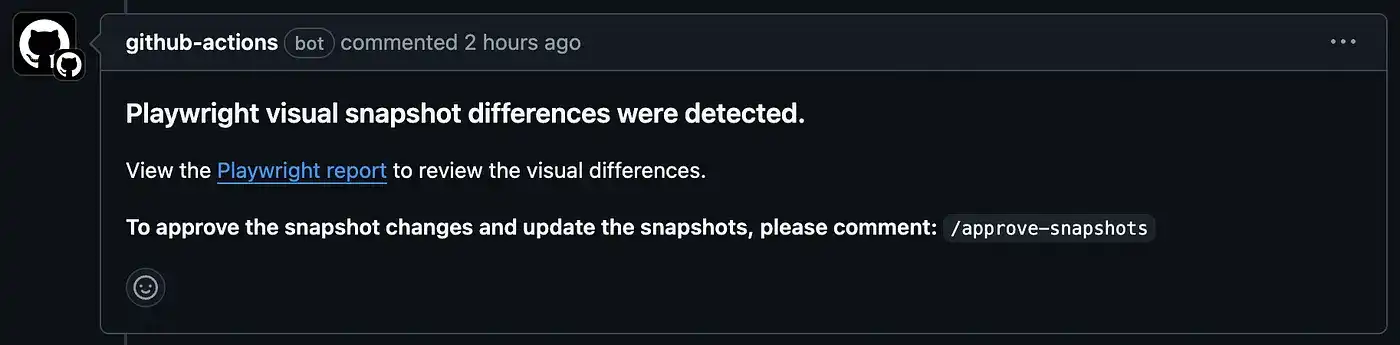
The first GitHub Action runs Playwright tests and checks the logs for any snapshot issues (missing or mismatched snapshots). If there's an issue, it posts a comment to the pull request (PR) with a link to the Playwright report so engineers can review the differences.
Code for action 1:
name: Playwright Tests
on:
  push:
    branches: [main]
  pull_request:
    branches: [main]
jobs:
  playwright:
    timeout-minutes: 60
    runs-on: ubuntu-latest
    permissions:
      contents: write
      pull-requests: write
    steps:
      - uses: actions/checkout@v4
      - uses: actions/setup-node@v4
        with:
          node-version: lts/*
      - name: Install dependencies
        run: npm install -g pnpm && pnpm install
      - name: Install Playwright Browsers
        run: pnpm exec playwright install --with-deps
      - name: Run Playwright tests
        run: |
          pnpm exec playwright test | tee output.log
          if grep -q -e "Error: A snapshot doesn't exist at" -e "Screenshot comparison failed" output.log; then
            echo "Playwright tests failed due to a snapshot issue."
            echo "SNAPSHOT_DIFFERENCES=true" >> $GITHUB_ENV
            exit 1
          elif grep -q "failed" output.log; then
            echo "Playwright tests failed due to a non-snapshot issue."
            exit 1
          fi
      - uses: actions/upload-artifact@v4
        id: artifact-upload
        if: always()
        with:
          name: playwright-report
          path: playwright-report/
          retention-days: 30
      - name: Comment on PR with report link
        uses: thollander/actions-comment-pull-request@v3
        if: ${{ failure() && env.SNAPSHOT_DIFFERENCES == 'true' }}
        with:
          message: |
            ### Playwright visual snapshot differences were detected.
            View the [Playwright report](${{ steps.artifact-upload.outputs.artifact-url }}) to review the visual differences.
            **To approve the snapshot changes and update the snapshots, please comment:** /approve-snapshots
Let's break down the key steps in this action:
-
Run Playwright tests
This step executes the Playwright tests and logs the output using
pnpm exec playwright test | tee output.log. We also check for specific errors in the logs, such as missing snapshots or screenshot comparison failures. If any of these issues are detected, the action sets an environment variableSNAPSHOT_DIFFERENCES=trueand exits with an error code. This is crucial for determining whether the test failure is related to snapshots, as opposed to other types of test failures. -
Upload Playwright artifacts
- uses: actions/upload-artifact@v4
  id: artifact-upload
  if: always()
  with:
    name: playwright-report
    path: playwright-report/
    retention-days: 30
This step uploads the Playwright test results (HTML report) as a GitHub Artifact, making it available for download and inspection in the GitHub Actions UI. The report provides visual diffs of any snapshot differences, helping engineers identify and review the exact nature of the issue.
- Comment on PR with report link
- name: Comment on PR with report link
  uses: thollander/actions-comment-pull-request@v3
  if: ${{ failure() && env.SNAPSHOT_DIFFERENCES == 'true' }}
  with:
    message: |
      ### Playwright visual snapshot differences were detected.
      View the [Playwright report](${{ steps.artifact-upload.outputs.artifact-url }}) to review the visual differences.
If there is a snapshot difference, this step adds a comment to the PR containing a link to the uploaded Playwright report. This makes it easy for the PR reviewer to quickly access the report, view the visual diffs, and decide whether to approve or reject the changes.
Action 2: Updating Snapshots on Comment
Once an engineer reviews the visual differences and decides the updated snapshots are correct, they can comment /approve-snapshots on the PR. This triggers the second action, which automatically updates the snapshots, commits the changes, and pushes them to the branch.

Code for action 2:
name: Update Snapshots on Comment
on:
  issue_comment:
    types: [created]
jobs:
  update-snapshots:
    name: Update Snapshots
    if: github.event.issue.pull_request && contains(github.event.comment.body, '/approve-snapshots')
    runs-on: ubuntu-latest
    permissions:
      contents: write
      pull-requests: write
    steps:
      - name: Get branch of PR
        uses: xt0rted/pull-request-comment-branch@v2
        id: comment-branch
      - name: Checkout PR branch
        uses: actions/checkout@v4
        with:
          ref: ${{ steps.comment-branch.outputs.head_ref }}
      - name: Comment action started
        uses: thollander/actions-comment-pull-request@v3
        with:
          message: |
            ### Updating snapshots. Click [here](https://github.com/${{ github.repository }}/actions/runs/${{ github.run_id }}) to see the status.
      - uses: actions/setup-node@v4
        with:
          node-version: lts/*
      - name: Install dependencies
        run: npm install -g pnpm && pnpm install
      - name: Install Playwright Browsers
        run: pnpm exec playwright install --with-deps
      - name: Run Playwright update snapshots
        run: pnpm exec playwright test --update-snapshots
      - name: Commit and push updated snapshots
        uses: stefanzweifel/git-auto-commit-action@v5
        with:
          commit_message: "Update e2e snapshots"
      - name: Comment success
        uses: thollander/actions-comment-pull-request@v3
        with:
          message: |
            ### 🎉 Successfully updated and committed Playwright snapshots! 🎉
Now, let's break down the key steps in this action:
-
Action if check
if: github.event.issue.pull_request && contains(github.event.comment.body, '/approve-snapshots') -
Get branch of PR
- name: Get branch of PR
  uses: xt0rted/pull-request-comment-branch@v2
  id: comment-branch
This step retrieves the branch associated with the PR where the comment was made. The action needs to know the branch to check out, as this is where the snapshot update will happen.
- Checkout PR branch
- name: Checkout PR branch
  uses: actions/checkout@v4
  with:
    ref: ${{ steps.comment-branch.outputs.head_ref }}
Here, we check out the branch associated with the PR. This ensures that the snapshots are updated on the correct branch (not the main branch), keeping the changes scoped to the current feature or fix being worked on.
- Comment action started
- name: Comment action started
  uses: thollander/actions-comment-pull-request@v3
  with:
    message: |
      ### Updating snapshots. Click [here](https://github.com/${{ github.repository }}/actions/runs/${{ github.run_id }}) to see the status.
Once the action starts, it posts a comment on the PR to let reviewers know that the snapshots are being updated and provides a link to the GitHub Actions log.

- Run Playwright update snapshots
- name: Run Playwright update snapshots
  run: pnpm exec playwright test --update-snapshots
This step re-runs the Playwright tests but with the --update-snapshots flag. This updates any snapshots that were previously flagged as different during the initial test run.
- Commit and push updated snapshots
- name: Commit and push updated snapshots
  uses: stefanzweifel/git-auto-commit-action@v5
  with:
    commit_message: "Update e2e snapshots"
Once the snapshots have been updated, this step commits the new snapshots and pushes the changes back to the PR branch automatically.

- Comment success
- name: Comment success
  uses: thollander/actions-comment-pull-request@v3
  with:
    message: |
      ### 🎉 Successfully updated and committed Playwright snapshots! 🎉
Finally, the action posts a success comment to the PR, letting the team know that the snapshots have been successfully updated and committed.

Conclusion
By shifting the responsibility of snapshot generation to CI, we were able to resolve the platform inconsistencies that plagued us when setting up our visual regression testing. The two GitHub Actions streamlined our workflow by automating the Playwright tests and snapshot approval process. Engineers now have a clear, consistent way to review, approve, and update snapshots directly from pull requests, ensuring our design system remains visually stable across all environments.
This new approach not only helped us improve our testing efficiency, but also gave us peace of mind knowing that our visual tests are reliable and consistent, no matter who is contributing or what environment they're working in.
For a practical demonstration of this setup, you can check out this repo with a pull request that walks through the entire process, from running Playwright tests to approving snapshot updates.
A huge thanks!
I want to give a big thanks to two engineers from another company, Tony and Clinton, for also running into this snapshot issue in CI and brainstorming this solution with me. This collaboration helped us come up with a clean and automated approach, and we hope it can help others who might be running into the same problem. ❤️